Your ChatGPT conversations.
Ready for what comes next.
Export to PDF, Markdown, DOCX, and JSON. Keep your code, tables, and math intact — right in your browser.
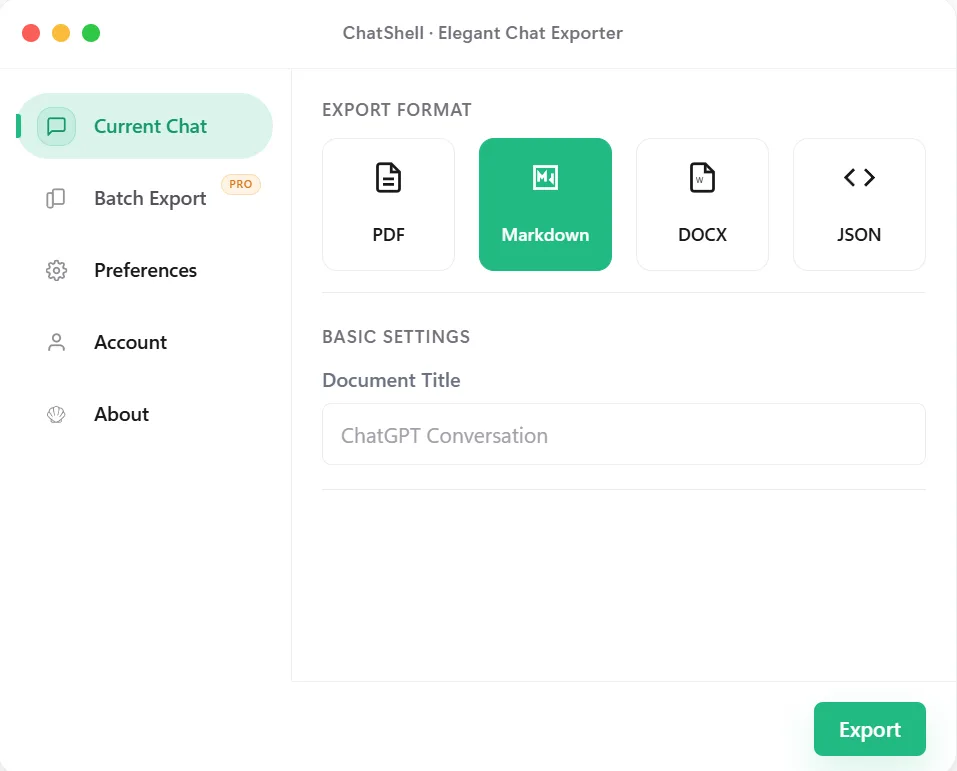
One conversation. Four useful formats.
From a good answer to a useful file.
-
Select chats
Pick one conversation or export multiple chats in batch.
-
Choose format
Choose PDF, Markdown, DOCX, or JSON and adjust options.
-
Save locally
Files are saved directly to your device. Nothing is uploaded.

Pick one conversation or export multiple chats in batch.
Choose PDF, Markdown, DOCX, or JSON and adjust options.
ChatShell creates the file locally without uploading the conversation.
Files are saved directly to your device. Nothing is uploaded.
Privacy First
Conversation content stays local. No third-party analytics or ad SDKs in the extension runtime.
Formula Rendering
Perfect LaTeX math formula support, exports remain clear and readable.
Batch Export
Export multiple chats to HTML/MD/DOCX/JSON with one click (Pro).
Start free. Export more when you need to.
Free
- ✓ PDF / MD / DOCX / JSON
- 3 PDF/month, 5 others total/month
- ✗ With watermark
- ✗ Batch export & Team space
Standard
- ✓ Unlimited exports · No watermark
- ✓ Timestamps & Remove separators
- ✗ Batch export & Team space
v1.0.0.20
2026-05-31
Markdown image export
v1.0.0.20
2026-05-31
Markdown image export
- Markdown export can now download referenced images next to the .md file instead of embedding them.
- Batch Markdown export includes the same Pro-only image option, with each conversation saved in its own folder inside the batch ZIP.
- Improved handling for generated and uploaded images, while keeping batch exports as one ZIP without nested ZIP packages.
A few things worth knowing.
All conversation data is saved only in your local browser. We cannot access, view, or store any of your data.
You will receive a License Key after subscribing. Enter it in the "Account" page of the extension to activate. If you reinstall in the same browser profile, entering the same key again restores the previous activation before ChatShell tries to consume a new activation slot.
All Chromium-based browsers are supported, such as Chrome, Edge, Brave, Arc, etc.
Single chat: PDF, Markdown, DOCX, JSON. Batch export: HTML, Markdown, DOCX, JSON.
ChatShell is intended to be activated on the current device/browser profile. Browser sync or reinstall recovery may restore a saved activation, but another computer can require a new activation and may hit the activation limit. If that happens, contact support.
ChatShell only uses the storage permission to save preferences and license info. It runs on chatgpt.com and contacts our license server for activation/validation.
ChatShell has moved from the browser print flow to its bundled PDF engine, generating PDF files directly in your browser. To render Chinese text, math symbols, and other scripts, the extension may load font files from approved CDN sources.
ChatShell now includes the Default template and the Wenfa template. Default keeps the layout closer to the original ChatGPT conversation with higher information density, which is better for backup, review, and preserving context. Wenfa uses a softer, more spacious layout for long-form reading, knowledge notes, and sharing.
After checkout, the Creem payment callback can take a few seconds to complete before the license email is generated and delivered. Wait a few seconds, then refresh your inbox. Contact support if it still does not arrive.
Make your next conversation a keeper.
Save the answers you want to come back to. Start with the free Chrome extension.
Add to Chrome — it’s free[email protected]